

 Written by Marvin Cavanaugh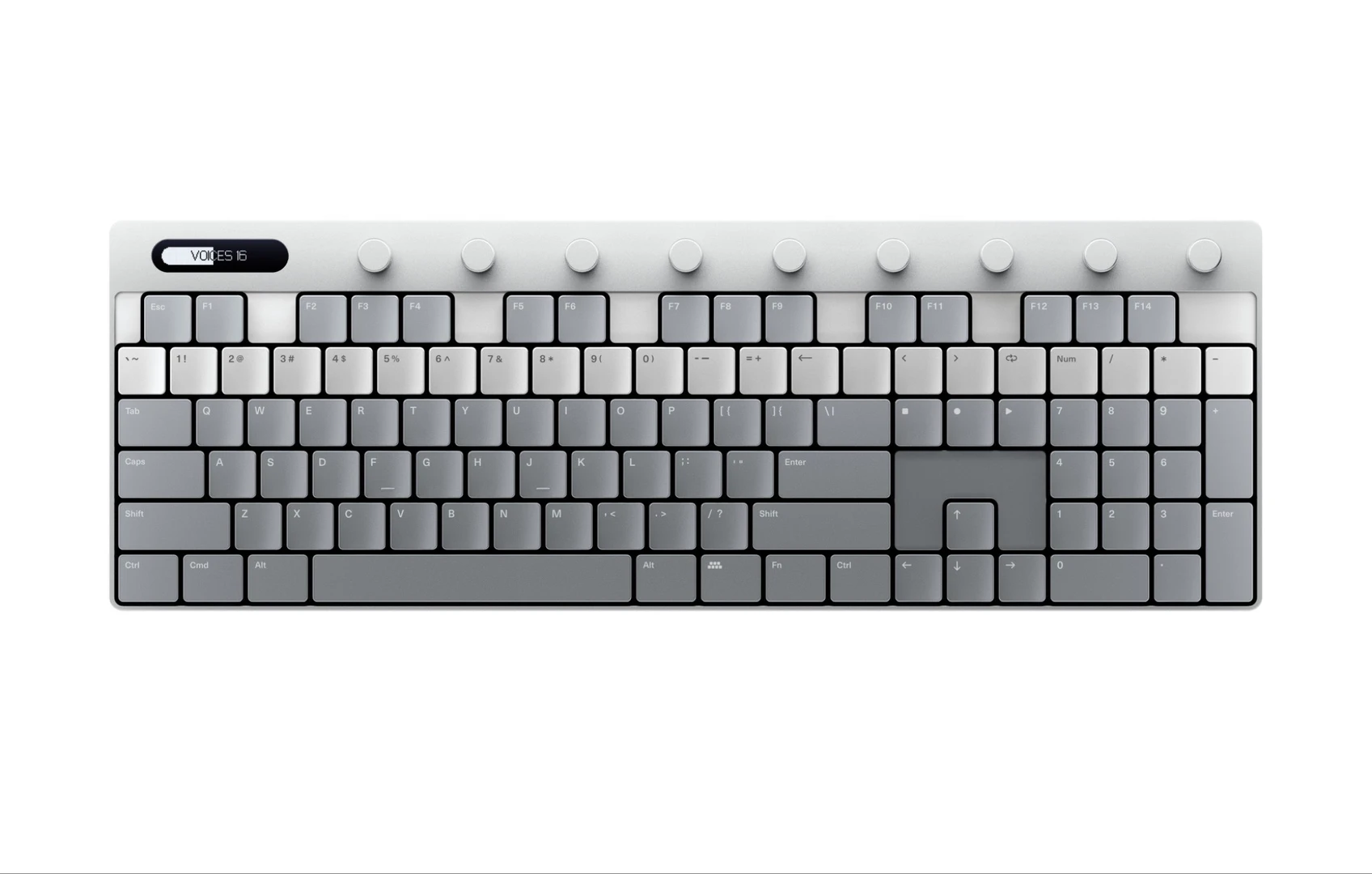
The desk is the pitch
Polyend unveiled Keys this week, a MIDI controller whose form closely echoes a computer keyboard. According to MusicTech, the company wanted a playable keyboard that would not require a full-size controller deck to occupy the desk. The pitch is easy to grasp: the object beside the mouse should earn its footprint by behaving like an instrument.
Many home-studio purchases are furniture decisions in disguise. A capable controller sees little use when it blocks the typing keyboard, crowds the trackpad, or has to be lifted from a shelf before every take. Polyend Keys proposes that compactness can be part of the creative workflow.
This announcement supports a concept-level assessment. Feel, response, software behavior, and long-session comfort still need hands-on verification.
What typing muscle memory can do
Many music apps already let a computer keyboard trigger notes. That familiar grid makes rough input possible when no controller is connected. A dedicated device in the same visual family could give that habit a fixed home and reduce conflicts with window focus or ordinary typing duties, provided its implementation is dependable.
Typing skill does not transfer whole to music making. A typist anticipates letters and words. A player manages interval shape, note overlap, rhythm, and sometimes pressure. The usual computer keyboard also staggers its rows, while a piano places repeating intervals along a line. Any QWERTY-like musical layout develops its own fingering vocabulary.
The useful measure is how quickly that vocabulary becomes predictable. Compact layouts can be legitimate instruments without imitating piano technique. Tracker users, laptop producers, and shortcut-heavy editors may adapt readily. Pianists who think in wide voicings will have a different threshold.
Run the small-desk test
The strongest case begins with an ordinary annoyance. A piano-style controller often pushes the computer keyboard away from the body, while the mouse drifts to one side and the display feels farther off. A smaller note surface could keep arranging, editing, and playing within the same reach zone.
That makes Keys potentially useful for entering bass lines while a session is open, auditioning a melody without rearranging the desk, or carrying a consistent note layout to a temporary workspace. These are modest jobs. Modest jobs are often where compact gear survives after the launch-week curiosity fades.
Desk fit is physical, so test it physically. Use the published dimensions to cut a cardboard footprint. Put it where Keys would live, route a spare cable from each plausible side, and work around it for an evening. Check access to the mouse, typing keyboard, audio interface, and monitor controls. If the mock-up goes into a drawer after twenty minutes, the real controller may follow.
Feel decides the instrument
The decisive questions are gloriously boring. Establish whether each key triggers reliably near its edges and during repeated notes. Dense chords should register every press. Confirm velocity support and any available response adjustment or aftertouch. A product page can resolve the feature list. Independent demonstrations and hands-on use must establish consistency.
Simultaneous recognition deserves special attention because ordinary typing keyboards vary in key rollover. Chords expose missed inputs faster than single-note demonstrations. Physical noise matters too when the controller shares a desk with an open microphone. A sharp clack may be harmless in headphones and annoying during spoken takes or acoustic recording.
Then inspect the operations around the notes. If octave changes, transposition, MIDI channel selection, custom mappings, or preset recall are offered, they should be easy to understand. Confirm connection type, power requirements, device compatibility, and whether setup depends on an editor or account. Test latency through the actual computer, buffer setting, and instrument because the controller is only one link in that chain.
Give it one job first
Before buying any compact controller, approximate its role with tools already on the desk. Enable computer-keyboard note input in the DAW, if available, and use it for several short writing sessions. Notice how often octave switching interrupts a phrase, which chord shapes feel cramped, and whether staying near the mouse actually keeps the session moving.
Then assign the prospective hardware one primary role:
- Sketching surface: Quick note entry while arranging and editing.
- Secondary surface: A small bank for synth lines or mapped cues beside a larger controller.
- Portable surface: A repeatable layout for sessions where a piano keyboard stays home.
Each role changes the buying test. Sketching rewards instant access. Secondary use demands stable mappings and clear state. Travel magnifies cable, power, and durability concerns. If laptop keys already cover the job, Keys would need to add better feel, reliable multi-note input, or cleaner routing to justify another object. Those gains should be demonstrated rather than assumed from the shape.
Who should watch it
Polyend has identified a real studio irritation. Desks fill up quickly, and many musicians need note entry more often than they need a piano-sized playing surface. Keys looks most persuasive for mouse-and-keyboard producers, tracker-minded writers, and musicians building a compact secondary rig.
Players whose ideas begin in broad two-handed voicings should compare range and articulation carefully. Finger drummers may remain happier with pad geometry. Anyone expecting QWERTY familiarity to erase practice will still have to learn where intervals live under the fingers.
The sensible launch verdict depends on the unglamorous details: consistent response, chord recognition, readable state, painless setup, and a footprint that works after the novelty wears off. Start with the cardboard template. If it can remain between the mouse and coffee mug for a full session, Polyend’s small-desk proposition has cleared its first meaningful test.
Comments
No comments yet.