

 Written by Avery Knox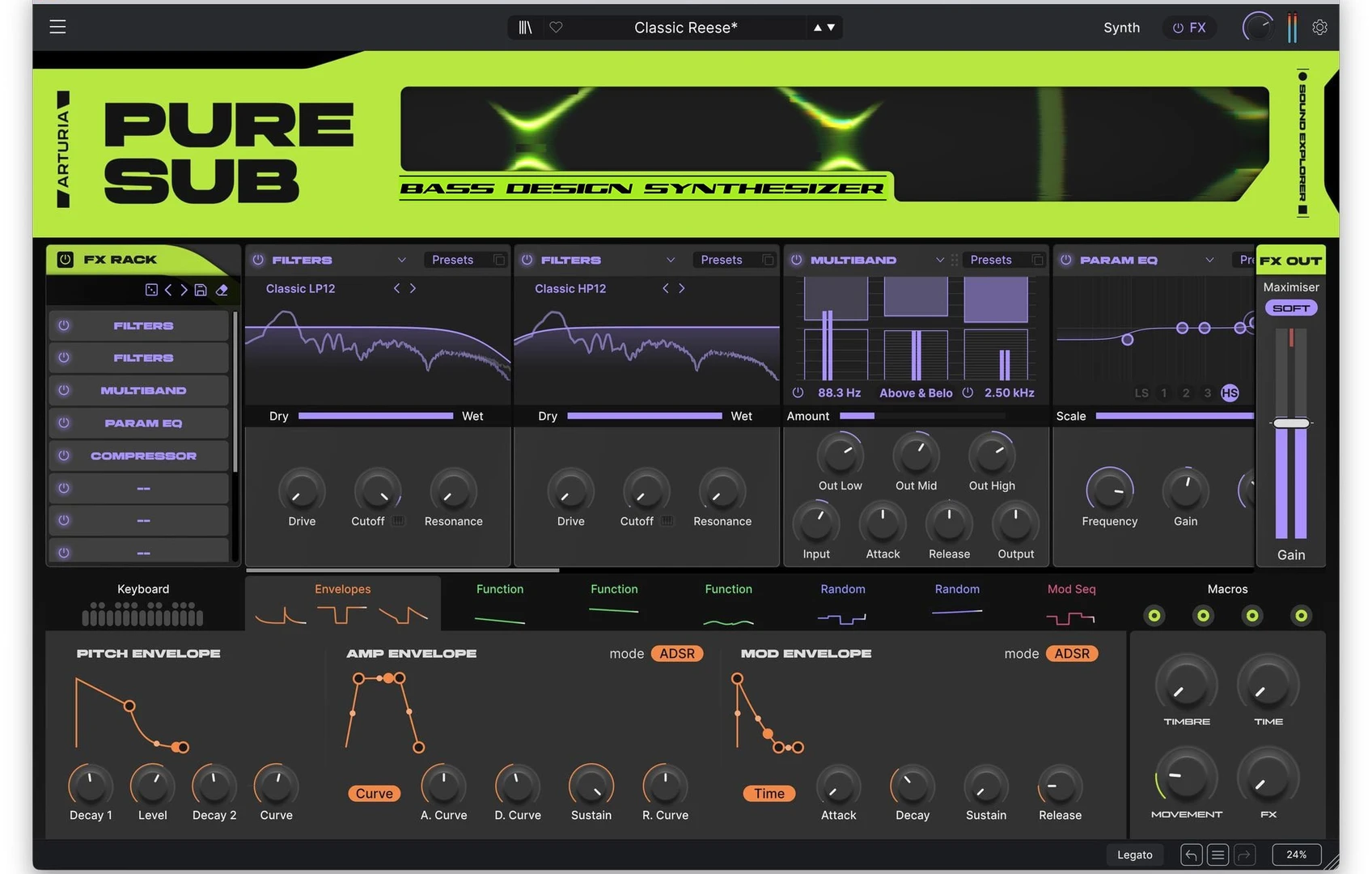
Bass gets its own room
Open a general-purpose synth to make one bass note and the screen can feel like a warehouse after closing. Oscillators, granular engines, modulation pages, effects racks, and a preset browser full of cinematic fog all wait while the kick loops for the sixty-fourth time. The capacity is welcome. The decision load can be brutal.
Arturia Pure SUB arrives with a shorter brief. Attack Magazine's August 31 walkthrough describes a monophonic software instrument centered on 808-style basses and Reese tones. Its engine separates the low end into Sub, Harmonics, and Texture, then supplies modulation, filtering, processing, and effects around them. The idea is easy to grasp: put recurring bass tasks in one room and leave unrelated machinery outside.
That boundary changes the first few minutes of a session. A specialist plug-in can remove routing chores and preset detours. It can also harden habits when every patch begins from the same architecture. Pure SUB is worth examining as workflow design, even before deciding whether it belongs in a particular plug-in folder.
Three layers, one job
Pure SUB's signal plan is vertically legible. The Sub chamber supplies a clean sine foundation and octave control. Harmonics offers Pressure, an additive engine aimed at solid 808 forms, or Reese, a wavetable engine for moving mid-bass. Texture adds sampled or virtual-analog noise, with import options for custom material. Individual levels and routing controls keep those functions distinct.
The useful mental model is foundation, identity, and abrasion. Solo the Sub layer and set the physical weight of the note. Add Harmonics until the bass retains enough character on smaller playback systems. Bring in Texture while the full arrangement is running, since noise that sounds exciting in isolation can occupy the same territory as percussion, vocals, and distorted guitars.
This order is more useful than scrolling until a preset sounds large. If the bass vanishes outside the main monitors, the harmonic layer needs attention. If the groove loses clarity, inspect the Sub envelope and note lengths. If the top edge fights the hi-hats, mute Texture. Three faders already tell you where to look.
Protect the fundamental
One of Pure SUB's smarter ideas is its sub routing. The published walkthrough notes that the sine layer can enter the master path after selected processing stages. That lets the fundamental remain clean while upper material meets the filter, distortion, modulation, and effects.
Low-frequency distortion can create useful harmonics, but it can also make level and stereo width harder to judge. A conventional session often handles this with a separate sine track, duplicated MIDI, grouped automation, and another channel to remember during revisions. Pure SUB folds that parallel structure into the patch.
Start with the Sub layer soloed and fit its amplitude envelope to the actual drum pattern. For an 808-style part, use the prominent pitch envelope to define the initial knock and downward gesture. For a Reese, keep the fundamental steady while movement develops above it. Then check the complete sound in mono before increasing Width or Space.
An analyzer can confirm where energy is collecting, although the arrangement remains the real test. Shorten overlapping notes, bypass processing, and compare the clean layer against the full patch. The useful result is visible in the mixer: one low-frequency path that stays stable while the upper bass changes between sections.
Modulation with a purpose
According to the walkthrough, Pure SUB uses the drag-and-drop modulation language familiar from Arturia Pigments. A dedicated pitch envelope sits near the front of the workflow. Amp and modulation envelopes, function generators, random sources, voice controls, and step modulation provide deeper movement. Four assignable macros sit above that machinery.
Those macros are most valuable as arrangement controls. Map one to movement by combining wavetable morph and filter motion. Use another for edge through Texture and drive. Let a third adjust impact through pitch-envelope amount and amplitude shape. Reserve the fourth for width and spatial processing. Record the mapping in the DAW's track notes so the session still makes sense after a month away.
Begin with one modulation source and listen through an entire phrase. Add another when the arrangement asks for a clear change. This prevents the animated interface from becoming its own form of preset browsing.
Once the patch behaves, print a short audio checkpoint. Bass modulation can react differently across long notes, transitions, and retriggered phrases. A rendered waveform beside the MIDI part makes those differences easier to spot than another ten minutes spent watching modulation rings move.
Where focus starts to pinch
Specialization introduces its own blind spots. Attack Magazine's reviewer reports that the Sub Processor disappears when the main effects page is open, even though the two sections are likely to be adjusted together. That forces extra page switching during one of the most iterative parts of bass design.
The instrument's remit also stays close to 808 and Reese territory. Producers who regularly need many unrelated bass families may still reach a desired result faster in a broad synthesizer they already know. Familiarity has its own speed, especially when templates and macro mappings are already built.
Before adding any focused tool, audit one completed project. Recreate a representative bass part and count the setup tracks, routing steps, automation lanes, and recall problems. Then sketch the same role with the specialist instrument. A meaningful improvement should appear in the session structure as well as the stopwatch.
Restraint still matters inside a narrow synth. Pure SUB includes a substantial effects rack, with 17 types reported in the review. Save a dry version before the processing chain starts accumulating. When every audition acquires the same wide, scarred top end, pull the Texture fader down and reopen the clean patch.
A one-job synth protocol
Treat Pure SUB as a role-based instrument. Presets can remain starting points, while the arrangement decides what survives.
1. Define the role. Write one sentence before opening the browser. Decide whether the track needs a sub anchor, a pitched 808, or a moving Reese layer.
2. Build from the bottom upward. Set Sub level, tuning, note length, and envelope first. Add Harmonics for translation and identity. Introduce Texture only after the drums and lead elements are present.
3. Keep movement accountable. Assign every modulation source to an audible arrangement function. Verse-to-chorus intensity and end-of-phrase motion are useful jobs. Constant motion without a musical cue usually needs another listen.
4. Check context at ordinary volume. Compare mono, smaller speakers, and the main monitoring system. Adjust upper harmonics when the fundamental cannot reproduce, rather than pushing the entire bass louder.
5. Print a checkpoint. Keep the MIDI source muted nearby, label the audio version, and retain one dry state. Future revisions then begin from an identifiable decision instead of a mystery preset.
One-job plug-ins are multiplying because modern sessions already contain ample possibility. Range remains the broad synth's advantage. A specialist has to repay its narrower scope by removing repeated setup and making revisions easier to understand.
Pure SUB's published design makes that case through routing and role separation rather than sheer option count. If the tool fits, the evidence will be mundane: one clearly named bass track, a clean low-frequency path, four understood macros, and no forgotten sine-wave channel blinking at the bottom of the mixer.
Comments
No comments yet.